- PC: Windows XP, 7, 8, 10, 11
- Size: 157 MB
- Language: English
CS 1.6 with bots download – free Counter-Strike 1.6 with built-in bot support for offline play. No internet connection required – install and play immediately against CPU-controlled opponents. Works on Windows XP, 7, 8, 10 and 11. No Steam account needed. 157 MB direct download.
| Name | Counter-Strike 1.6 with Bots |
|---|---|
| Compatible with | Windows XP, 7, 8, 8.1, 10, 11 |
| Price | Free |
| Size | 157 MB |
| Bots included | Yes – ZBot, offline singleplayer |
| Online play | Yes – Rampage masterserver |
| Slowhack protection | Yes |
How to Download Counter-Strike 1.6 with Bots
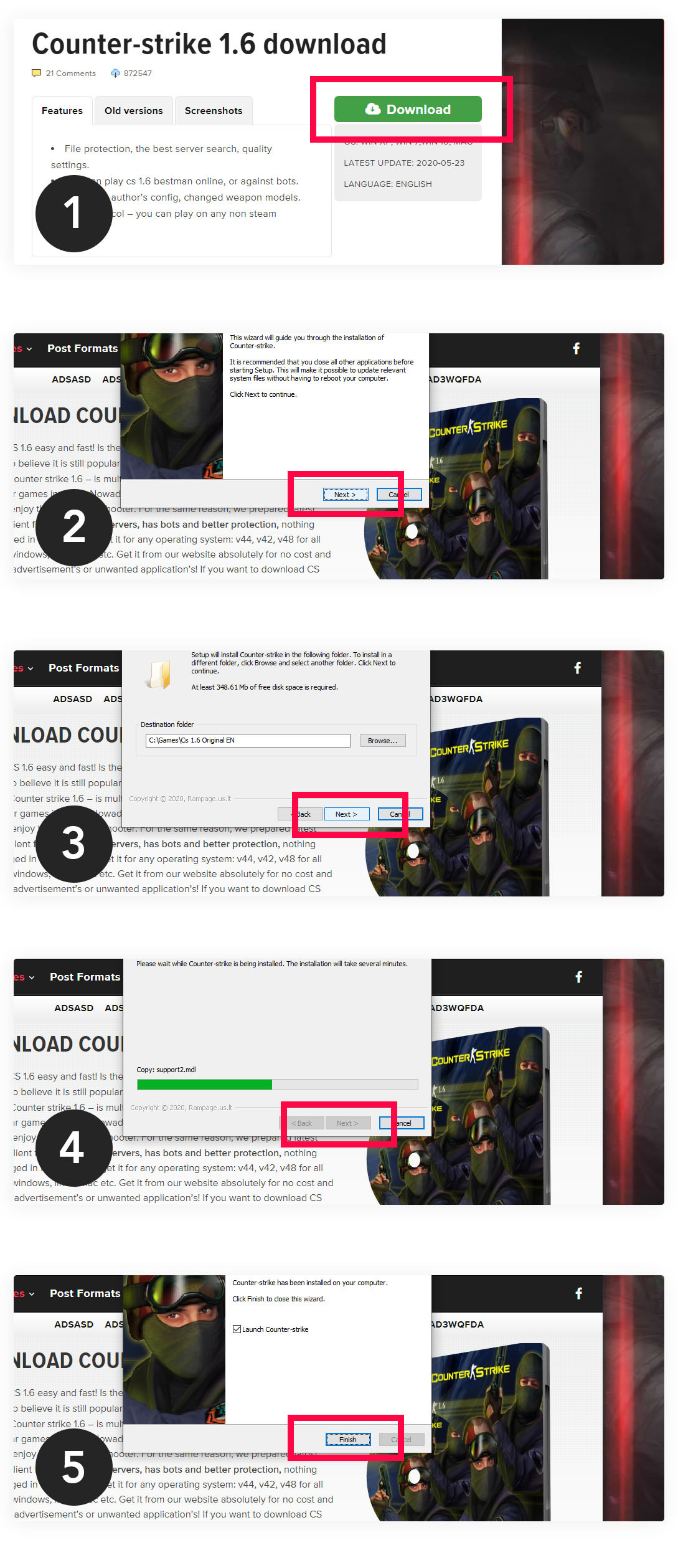
Click the Download CS 1.6 with Bots button above – 157 MB direct download. Bots are included in the installer – no extra files, no separate bot pack needed. Download once, play offline instantly.
How to Install CS 1.6 with Bots on Windows
- Download the 157 MB setup file above
- Open the downloaded .exe installer
- Click Next through the setup steps
- Choose installation folder – use
C:\Games\CS16\ - Click Finish – CS 1.6 shortcut appears on your desktop
- Launch the game – bots are ready to use immediately
How to Play CS 1.6 with Bots Offline
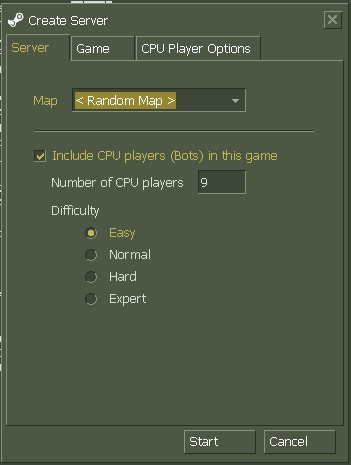
Once installed, starting an offline game with bots takes under 30 seconds:
- Launch Counter-Strike 1.6 from your desktop shortcut
- Click New Game in the main menu
- Select a map from the list
- Check Include CPU players (Bots) in this game
- Set the Number of CPU players – up to 9 bots per team
- Choose difficulty – Easy, Normal, Hard or Expert
- Click Start
You can also add bots mid-game by pressing H to open the bot menu. From there you can add, remove, kick or switch bots between teams at any time.
How to Add Bots in CS 1.6 Using Console
Press ~ (tilde) to open the developer console. If the console does not open – go to Options > Keyboard > Advanced and enable Developer Console. Console commands for bots:
bot_add– add one bot to the gamebot_add_ct– add bot to Counter-Terrorist teambot_add_t– add bot to Terrorist teambot_kick– remove all botsbot_difficulty 0– Easy difficultybot_difficulty 1– Normal difficultybot_difficulty 2– Hard difficultybot_difficulty 3– Expert difficultybot_quota 10– set total number of bots to 10
What is Counter-Strike 1.6 with Bots
Counter-Strike 1.6 with bots is the standard CS 1.6 build with ZBot support included. Bots are AI-controlled players developed by Turtle Rock Studios and later acquired by Valve. They automatically analyze maps, plant or defuse bombs, rescue hostages, throw grenades, use the radio and react to player movement and sound. Bots in CS 1.6 can be set to four difficulty levels. On Easy they stand still while shooting. On Expert they move unpredictably, aim precisely and use grenades effectively. This makes CS 1.6 offline bots useful for both beginners learning maps and experienced players warming up aim and spray patterns. This version also supports full online play – open Find Servers in the main menu to browse active Non-Steam servers through the built-in Rampage masterserver. Looking for other versions? Download Counter-Strike 1.6 from our main page – all versions free for Windows.
Recommended servers
| Deathmatch | Connect 91.211.247.222:27016 |
|---|---|
| Public | Connect 91.211.247.221:27015 |
| Deathrun | Connect 91.211.247.224:27021 |
| CSGO Mod | Connect 91.211.247.222:27015 |
| SentryGun | Connect 91.211.247.221:27016 |
| Surf+CSDM | Connect 91.211.247.225:27015 |
| Army Mod | Connect 91.211.247.230:27019 |
| Freez Mod | Connect 91.211.247.226:27016 |
| Knife mod | Connect 91.211.247.221:27018 |
| Jailbreak | Connect 91.211.247.227:27015 |
| Zombie mod | Connect 91.211.247.230:27024 |
| AWP maps | Connect 91.211.247.220:27016 |